Inside fLMCP: making a real-time DAW reliable for tool-using agents.
The interesting part is not that fLMCP exposes 159 tools. It is how those tools cross thread, process, and scripting-context boundaries without pretending a stateful desktop application is a clean web API.
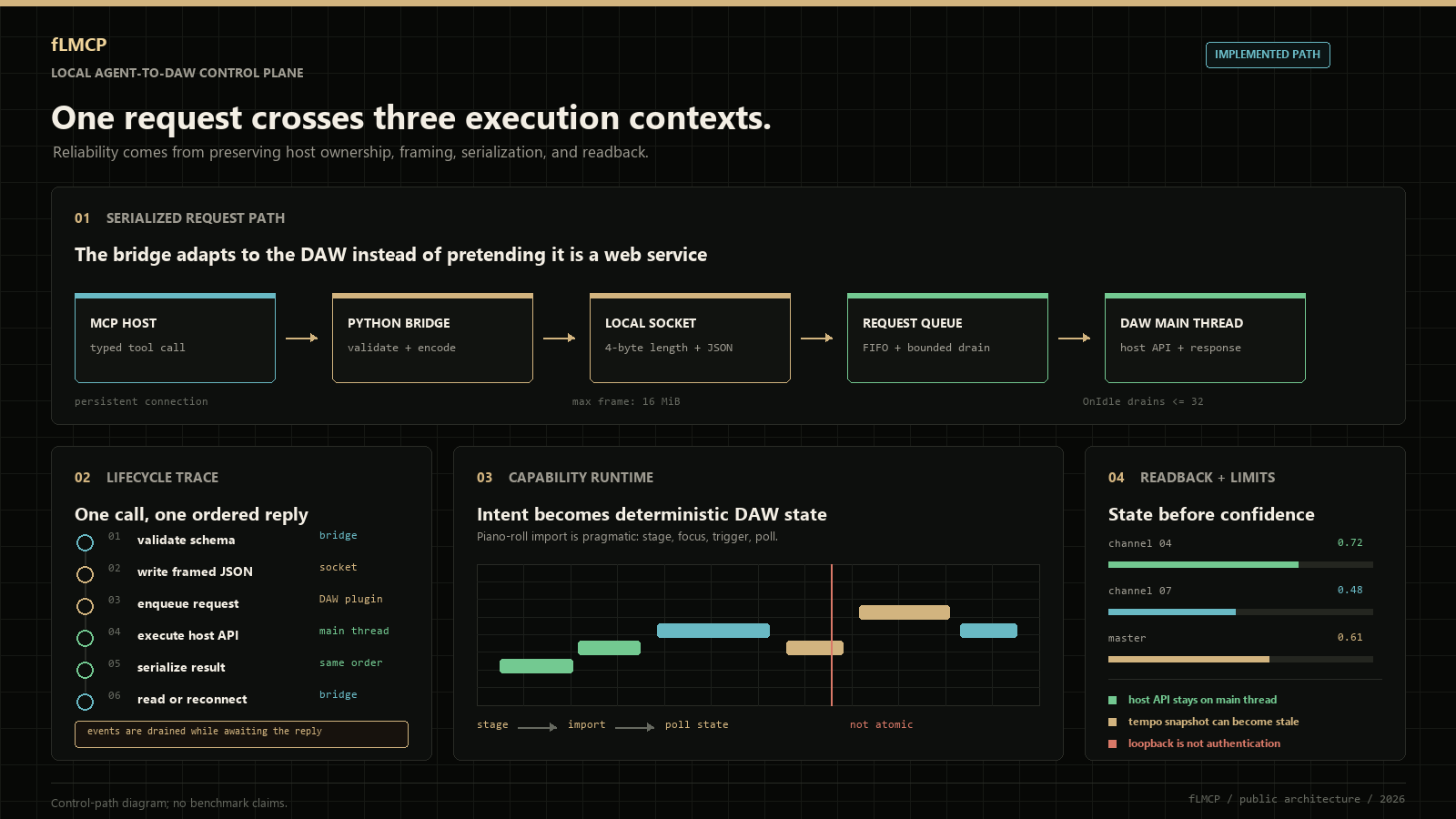
fLMCP began with a less glamorous question than "can an agent make a beat?": can software change a live FL Studio project without corrupting the session, blocking the UI, or losing track of what it changed? A useful answer had to survive the DAW's real constraints: a non-thread-safe host API, capabilities split across Python runtimes, partial public coverage, mutable UI context, and musical operations whose timing matters.
The resulting system exposes 159 MCP tools and 7 read-only resources, but surface area is not the main result. The core result is an execution model: observe before mutating, validate at each boundary, run host calls on the host thread, compile high-level musical intent into deterministic note data, and return a truthful error when the public API cannot perform an operation.
Public repository geezoria/FLStudioMCP The repository is public. This write-up focuses on the decisions that make the bridge trustworthy, including the compromises imposed by FL Studio's scripting model.github.com/geezoria/FLStudioMCP
The hard problem is preserving the DAW's execution model.
A desktop DAW is not a stateless API with a GUI attached. It is an interactive process with mutable selection, transport state, plugin state, timing-sensitive work, and a host-owned event loop. Even apparently simple commands have hidden preconditions. Setting a step in a non-current pattern, for example, requires temporarily switching context and restoring it; some mute and solo calls are toggles rather than setters; piano-roll note objects are unavailable to the general controller runtime.
That changes the design target. fLMCP is not trying to make every FL operation look equally reliable. It classifies what can be read, what can be mutated, which runtime owns the capability, and how failure should be represented:
- Resources describe current state. They give an agent a non-mutating orientation pass before it chooses an edit.
- Tools express bounded mutations. Parameters are explicit; results and limitations are machine-readable.
- The controller runtime owns ordinary DAW calls. Socket workers enqueue work but never call the host API directly.
- The piano-roll runtime owns notes. fLMCP crosses that context boundary instead of faking note entry with mouse coordinates.
- Optional analysis stays optional. Audio and transcription dependencies are loaded only when those tools run.
Three runtimes, one request path.
The external Python process speaks MCP over stdio. Inside FL Studio, a controller script owns a loopback TCP endpoint and the ordinary host API. A companion piano-roll script owns note-level operations. Treating these as separate runtimes is more than an architecture diagram: it prevents the external server from assuming that every FL capability can be imported or called from the same place.
transport_set_tempo.
OnIdle() drains at most 32 calls and invokes the FL API on FL's thread.
# wire envelope used between the MCP process and FL
request = {
    "id": 42,
    "action": "transport.setTempo",
    "params": {"bpm": 174.0}
}

# frame = uint32_be(len(payload)) + utf8_json(payload)
# response = {"id": 42, "ok": True, "result": {...}}
uint32_be
{id, action}
ok, result, or an error. Event frames deliberately have no id.
{ok, result}
The protocol is deliberately unremarkable. A four-byte length prefix makes a TCP byte stream parseable without delimiters; a hard frame limit bounds allocation; request ids distinguish replies from event frames; and one client-side lock prevents concurrent callers from interleaving bytes on the persistent connection. FL currently emits transport and refresh events, but the MCP-side client drains them while waiting for its reply rather than exposing them upstream. That is an honest boundary in the current release, not a capability we claim early.
There is also a subtle trade-off: the response is written from OnIdle() after executing the host call. On loopback with bounded payloads that is normally short, but it still places a socket write on the DAW thread. A future bridge can hand completed responses back to an I/O thread without weakening the main rule: only the host thread may touch the FL API.
Correctness comes from respecting boundaries, not from adding tools.
The network path never owns the FL API.
Socket workers do framing and queue insertion only. OnIdle() performs the mutation on FL's thread, preserving the host's threading contract and giving every call one serialization point.
Automation is scheduled, never slept through.
Points carry monotonic deadlines and are applied across idle ticks. The call returns immediately, so a four-bar automation curve does not freeze the UI for four bars. The current scheduler snapshots tempo at submission, making later tempo changes an explicit drift case.
Notes are executed where note APIs exist.
The controller can select a channel and open its piano roll, but it cannot import the note API. fLMCP stages a typed batch for the dedicated piano-roll runtime and reads the resulting score state back.
Unsupported means unsupported.
Clip placement, some arrangement operations, and direct preset jumps are absent from the public API. The corresponding tools return a structured limitation and a practical fallback; they do not report synthetic success.
A useful agent integration starts with a capability map, not a list of UI gestures. In fLMCP, "which runtime may perform this operation?" is part of the tool's semantics.
The piano-roll bridge is a pragmatic cross-context transaction.
Note editing is where a generic automation story breaks down. FL exposes score.addNote, score.deleteNote, and note objects only to piano-roll scripts. The controller runtime can prepare context, but it cannot legally perform the edit. fLMCP therefore treats the piano-roll script as a small execution service: select the target pattern and channel, stage a JSON batch, focus the piano roll, trigger the active script, and poll for exported state.
The handoff is intentionally visible on disk and easy to debug. It is also the least transactional part of the architecture. The current implementation clears the previous state, appends the requested actions, sends a foreground hotkey, and polls every 50 ms for up to three seconds. A failed focus change or a different active script can prevent execution. Correlation ids and atomic file replacement would make stale-state rejection stronger; removing the hotkey dependency would require a host API that FL does not currently expose. Calling out that weakness is more useful than hiding it behind the word "automation."
# public MCP tool call
piano_roll_add_notes(
    channel=4,
    pattern=2,
    clear_first=True,
    notes=[
        {"midi": 48, "time_bars": 0.0, "duration_bars": 1.0, "velocity": 0.78},
        {"midi": 55, "time_bars": 0.0, "duration_bars": 1.0, "velocity": 0.78},
        {"midi": 60, "time_bars": 0.0, "duration_bars": 1.0, "velocity": 0.78},
    ],
)

# bridge contract:
# select context -> stage batch -> trigger script -> read score state
Tool count is inventory; domain boundaries are the interface.
One hundred and fifty-nine registrations sound impressive, but count alone says little about reliability. The useful property is that the catalogue follows the DAW's domain model: transport calls do not smuggle in mixer changes, generators emit inspectable note data, project tools preserve undo semantics where the host exposes them, and unsupported operations remain visible as capabilities with known limits.
| Area | Tools | What it enables |
|---|---|---|
| Transport, patterns, project | 38 | Play/stop/record, tempo, time signature, pattern creation, undo, save, and project metadata. |
| Channels, mixer, plugins | 51 | Channel rack inspection, step sequencer writes, routing, EQ, send levels, plugin parameters, presets, and editors. |
| Piano roll, playlist, arrangement | 30 | Note writing, reading, quantizing, transposing, humanizing, markers, playlist tracks, and arrangement navigation. |
| Automation, UI, meta | 16 | Tempo/channel/mixer/plugin automation, window focus, hints, reconnects, raw bridge calls, and health checks. |
| Generators, voice, audio | 24 | Scales, chords, progressions, arpeggios, basslines, drum grooves, voice-to-MIDI, audio analysis, slicing, and DnB flips. |
The seven fl:// resources are the other half of the contract. They are read-only queries, not a synchronized database snapshot, but they let an agent orient itself before a mutation and verify selected state afterwards. That read-act-read loop is materially safer than generating a long sequence of blind commands from a stale prompt.
fl://statusBridge and transport snapshot.fl://projectProject-level metadata.fl://transportPlayback and position state.fl://channelsFull channel rack state.fl://mixerMixer track state.fl://patternsPattern list and metadata.fl://playlistPlaylist tracks and markers.High-level tools compile intent; they do not improvise behind the API.
The generator layer is deterministic Python, not a second language model hidden inside the bridge. A progression name maps to scale degrees and chord qualities; a bassline style maps those roots to timed MIDI events; drum styles map symbolic voices to step grids. The agent chooses the musical intent, while ordinary code expands it into repeatable note data that can be inspected, tested, and cleared as one operation.
Compile one musical brief into three deterministic parts.
pattern_create(name="Verse - 174 DnB sketch")
transport_set_tempo(bpm=174)

gen_emit_drum_pattern_step_seq(
    channel_map={"kick": 0, "snare": 1, "clhat": 2, "ophat": 3},
    style="drum_and_bass",
    repeats=2,
)

gen_emit_bassline(
    channel=4,
    root="C2",
    scale="minor",
    progression="i-VII-VI-V",
    pattern_style="octaves",
)

gen_emit_chord_progression(
    channel=5,
    root="C4",
    scale="minor",
    progression="i-VII-VI-V",
    chord_length_bars=1.0,
)
Use a read-act-read loop for stateful edits.
# agent-side orchestration pseudocode
before = read_resource("fl://channels")
target = find_channel(before, name_contains="Sub")

if target is not None:
    channel_route_to_mixer(index=target.index, mixer_track=12)
    mixer_set_eq_band(track=12, band=1, gain=-0.2, frequency=180)
    after = read_resource("fl://channels")
    assert route_for(after, target.index) == 12
Turn a hummed phrase into editable note events.
voice_to_piano_roll(
    duration_sec=8,
    bpm=120,
    scale_root="C",
    scale="minor",
    quantize_grid_sec=0.125,
    min_confidence=0.35,
    clear_first=True,
)
Analyze first; transform second.
analysis = audio_analyze(
    path="C:/samples/source_loop.wav",
    extract_melody=True,
    polyphonic=False,
)

song_to_dnb_flip(
    audio_path="C:/samples/source_loop.wav",
    target_bpm=174,
    dnb_style="amen",
    dnb_bars=4,
    include_melody=True,
    include_bass=True,
)
Audio becomes useful only after it is converted into editable state.
The audio layer is optional by design. Core transport, mixer, channel, plugin, and generator tools boot without NumPy, librosa, microphone drivers, or a transcription runtime. Heavy modules are imported at tool invocation, so an unavailable audio extra degrades one capability instead of preventing the entire MCP server from starting.
For humming and isolated melodic lines, fLMCP uses pYIN-based fundamental-frequency tracking. It segments stable pitch regions into note events, drops short or low-confidence notes, optionally snaps pitches to a scale, quantizes starts, and converts seconds into bar positions using the requested BPM. Polyphonic mode routes overlapping-note transcription through Basic Pitch on ONNX. These are different estimators with different failure modes; the interface reports which engine produced the notes rather than pretending the outputs are equivalent. We do not publish an accuracy score because no representative evaluation corpus has been established yet.
Five ideas worth carrying into other agent integrations.
The most reusable parts of fLMCP have little to do with one DAW. They apply to CAD tools, video editors, scientific desktops, and any application whose internal runtime is richer than its automation API.
Model capabilities, not clicks.
A typed operation captures preconditions and failure modes. A recorded gesture captures only one lucky UI state.
Keep observation separate from mutation.
Read-only resources make planning and post-condition checks possible without turning every inspection into a side effect.
Cross threads through queues.
When a host API belongs to its event loop, move data across the boundary and execute there. Do not move the API.
Compile high-level intent deterministically.
Let the model choose a progression or routing goal, then let tested code expand it into exact low-level operations.
Make limitations part of the protocol.
An explicit "not exposed by the host" result is actionable. Silent no-ops and invented success poison every later decision.
The trust boundary is local, narrow, and worth stating precisely.
fLMCP does not erase the limits of FL Studio's public Python API. It documents them and turns them into predictable behavior. Unsupported clip placement, direct project rendering, some arrangement operations, and numeric preset jumps return structured limitations instead of false success.
127.0.0.1, but it does not authenticate local processes. Exposing or proxying the port would change the threat model and is outside the design.
Most correctness bugs were adapter bugs, not music bugs.
Host APIs with positional mode flags are deceptively easy to call incorrectly. In one class of failures, a boolean intended to select a global channel index landed in the earlier pickupMode slot. Elsewhere, toggle-only calls were treated like setters, and a color adapter assumed the wrong byte order. Every command returned something; several still meant the wrong thing.
# Same Python type, different host semantics.
volume = channels.getChannelVolume(index, True)          # True is mode, not global index
volume = channels.getChannelVolume(index, False, True)   # mode=False, useGlobalIndex=True

# Toggle-only API: read first, then change only if needed.
if bool(channels.isChannelSolo(index)) != requested_solo:
    channels.soloChannel(index)
The response was to make the host boundary testable. The FL-side module can be imported with host modules stubbed out; public API stubs catch missing names and signature drift; fake TCP peers exercise framing and reconnect behavior; and pure tests cover generators, audio conversion, lazy imports, and server registration. This does not replace an end-to-end DAW test, but it moves a large class of regressions out of manual clicking.
What comes next is stronger evidence, not a larger catalogue.
The next useful milestones are concrete: expose bridge events to MCP clients instead of discarding them, add correlation ids and atomic replacement to the piano-roll file handoff, move response I/O off the DAW thread, attach explicit post-condition checks to destructive workflows, and place undo checkpoints around multi-step edits. Audio transcription also needs a small, representative evaluation set before confidence thresholds can be discussed as measured quality rather than tuning defaults.
fLMCP's broader lesson is simple. Professional desktop software becomes a credible agent environment when the integration respects thread ownership, capability boundaries, state verification, and failure semantics. The model is only one participant. The reliability comes from the ordinary engineering around it.